DIGICORP CIVIL Design is an add-on for Autodesk AutoCAD and Bricsys BricsCAD for the design and quantity takeoff of civil works: essential for technicians.

Try nowWhat is CIVIL Design?
There are many types of interventions on the territory: CIVIL Design offers different configurations, called "solutions", tailored to address different design topics.
You can access CIVIL Design features through CAD&Pillar software, which already has the OEM engine integrated and is compatible with AutoCAD 2024.
The new release 14 is now available!
Design by drawing—now with BIM too—beyond every obstacle.
Learn moreRoads and railways
E' la soluzione più venduta e consente di progettare strade, ferrovie ed opere lineari in genere rispettando le normative di riferimento. E' inclusa nella macro-soluzione Opere Civili.
Civil Works
E' la soluzione di CIVIL Design più ampia per affrontare i temi progettuali più disparati e complessi come strade, ferrovie, dighe, opere marittime, aeroporti, sistemazioni di grandi estensioni, ecc.
QUICK Roads
E' la soluzione per gestire rilievi topografici qualsiasi, generare il modello digitale 3D del terreno e progettare l'opera lineare con le stesse funzionalità della soluzione Strade e Ferrovie ma con alcune limitazioni.
Rail Control
Rail Control è la soluzione sviluppata per il rilievo del binario, la sua correzione in funzione del progetto ed al suo controllo nel tempo. E' stata ideata pensando agli enti gestori di linee ferroviarie, alle imprese di costruzione ed ai progettisti di interventi di modifica o riprogettazione di linee esistenti.
Road signs
E' una soluzione pensata per la gestione della segnaletica verticale ed orizzontale prescritta dal Nuovo Codice della Strada. Consente di redigere le tavole della segnaletica e di restituire il computo tabellato della segnaletica verticale lavorando direttamente all'interno di AutoCAD.
Tunnel
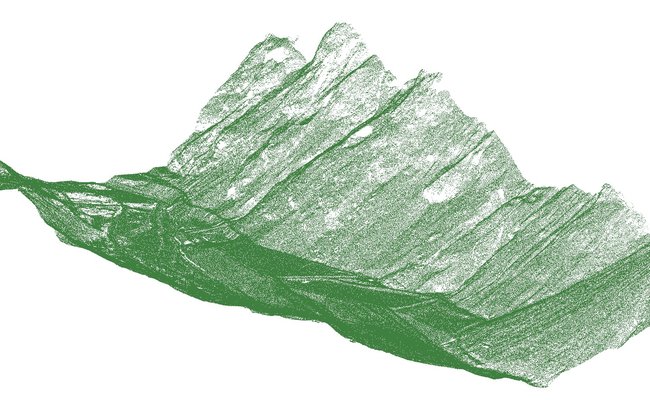
È il software dedicato alla visualizzazione ed all’analisi dei dati generati da rilievi di gallerie eseguiti con laser scanner.
Vuoi utilizzare rilievi laser scan di gallerie in modo veloce ed efficiente? Abbiamo sviluppato CIVIL Design Tunnel per ottimizzare la gestione dei dati.
Quarries and Landfills
Questa soluzione ti consente di progettare e gestire modelli digitali 3D, tipicamente cave e discariche. Computa i volumi con il metodo dei prismoidi e consente di definire spianamenti.
QUICK Querries
E' la soluzione Ligth di Cave e Discariche: ti consente di progettare e gestire modelli digitali 3D, tipicamente cave e discariche.
Watersheds
E' la soluzione di CIVIL Design per lo studio idrologico-idraulico dei bacini idrografici.
Aqueducts
E' la soluzione per progettare, calcolare e verificare reti in pressione direttamente in ambiente AutoCAD. Ti permette di interfacciarto il motore di calcolo EPANET.

Sewers and drainage networks
E' la soluzione che aiuta a gestire le reti di fognatura e di drenaggio
Topography
E' la soluzione indicata per i tecnici che eseguono i rilievi topografici, che progettano e costruiscono opere civili senza dimenticare gli aspetti relativi agli inserimenti catastali ed ai frazionamenti.
Cadestre
Le funzionalità relative alle procedure del Catasto Terreni sono contenute nella soluzione Topografia.
Raster
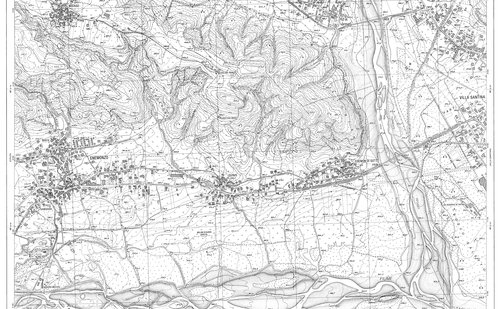
La soluzione Raster è stata studiata per permettere ai clienti di CIVIL Design di potenziare la gestione delle immagini raster in AutoCAD. Nei progetti di opere sul territorio, infatti, c'è sempre la necessità di utilizzare cartografie raster, come Carta Tecnica Regionale, ortofoto, foto satellitari o mappe catastali.
Accounting Sections
È la soluzione di CIVIL Design che permette di disegnare sezioni di computo, vestirle e calcolare le aree e i volumi. Strumento indispensabile per la progettazione e per la gestione la contabilità di movimenti di materia.
Profiles
È la soluzione che comprende tutte le funzioni necessarie a progettare e disegnare profili di qualsiasi tipo di opera. Grazie alla flessibilità ed alla possibilità di gestire un numero illimitato di polilinee e sezioni, è pertanto utilizzabile per profili di fognature, acquedotti, linee tecnologiche in genere.
Point clouds
È l'insieme delle funzionalità di CIVIL Design che permettono di usare in AutoCAD nuvole di punti da laserscan e ottenere sezioni e profili.
System requirements
Software and hardware requirements are the same as the full version of Autodesk AutoCAD© or Bricsys BricsCAD for the operating systems they support.
- Software and hardware requirements are the SAME as the full version of Autodesk AutoCAD© for the relevant supported operating systems.
- Windows 64-bit operating systems only.
- DIGICORP CIVIL Design 14© is an add-on for Autodesk AutoCAD releases 2021 to 2024 (64-bit) and related vertical products (AutoCAD Civil 3D, AutoCAD Map 3D, AutoCAD Architecture, AutoCAD Mechanical).
- Graphics card: the card must support OpenGL 4.5 or higher.
- For point cloud management, at least 16 GB of RAM is recommended.
- Software and hardware requirements are the SAME as the BricsCAD© version for the relevant supported operating systems.
- Windows 64-bit operating systems only.
- DIGICORP CIVIL Design 14© is an add-on for Bricsys BricsCAD 23 and 24 (64-bit) (Pro, BIM, Mechanical, Ultimate).
- Graphics card: the card must support OpenGL 4.5 or higher.
- For point cloud management, at least 16 GB of RAM is recommended.
Don't have AutoCAD or BricsCAD?
You can access CIVIL Design features through CAD&Pillar 10.0 software, which already has the OEM engine integrated and is compatible with AutoCAD 2024.
Digicorp Ingegneria s.r.l. YouTube Channel
Production and sales of software for the design and quantity takeoff of infrastructure (roads, railways, hydraulic works, topography). Technical design and consultancy services.
WatchFAQ
The software is used daily by thousands of technicians working in the field: surveyors, infrastructure designers, construction companies, and engineering firms. The software is structured to offer a solution for every design level.
The software comes with a printed tutorial describing the most common operations, an online help for using individual commands, and a video course which, in terms of topics covered, corresponds to a basic course on the software held by our technicians.
An average AutoCAD user with the necessary technical skills can start being productive right away because the approach is the same as drawing in AutoCAD. This minimizes the time (and costs) related to the learning period. For advanced needs, courses of varying duration are available at our headquarters or at the customer's site. For more information, please contact our sales office.
Initialization is used to activate the program commands. At the same time, specific layers are created, blocks are inserted, and a particular UCS is activated in the AutoCAD environment. This operation was designed to let you choose whether to work only with AutoCAD commands or with the addition of this add-on’s commands.
The entire project (of any size) is saved in a single DWG without having to rely on external databases. This ensures project data are always aligned and under control. When delivering the DWG to third parties, you can be sure you have provided everything needed. With the latest versions of the DWG extension there has been a significant reduction in file size (on average 40%), improving lightness and ease of sharing. Further new features are planned for the 2007 version.
Yes, because the program creates only CAD entities without the need for special files. Only for the correct display of survey points a shape file (CD-PUNTO.shx) is required, to be copied into the AutoCAD fonts folder on the recipient's computer. It is possible to modify or integrate projects created with the program using any AutoCAD.
CIVIL Design allows you to automatically build the 3D model of the linear work with a dedicated command. You can then integrate or modify this linear 3Dface model either with other commands or with AutoCAD commands. Additional commands have been developed for creating presentations and videos.
No, you need a full version of AutoCAD. The LT version does not allow loading external applications like ours.
Yes, because both Map and Civil 3D include a full version of AutoCAD. DIGICORP CIVIL Design uses standard CAD entities.
An alignment created with CIVIL Design is a 2D polyline drawn at elevation zero in AutoCAD model space. The polyline retains all the characteristics of any AutoCAD polyline, to which the program implicitly associates design data such as chainages, rotations, etc.
An alignment is generated from the "basic elements", i.e., AutoCAD line, arc, and circle entities, and from blocks generated by the program to build transition curves (parabolas and clothoids, also multi-parameter, flexures and continuities, polycentric curves, spirals...). The program setup allows proceeding with the planimetric layout phase both using a traverse alignment and using circles.
You can edit the alignment dynamically both graphically and by using a table that lists the alignment elements.
Two program versions are available: one allows creating and managing only one alignment (single-axis QUICK Roads solution), while the other allows managing any number of alignments (multi-axis Roads and Railways solution).
The program’s specific setup allows solving any problem involving at-grade and grade-separated intersections. Specific commands are available for the automatic and dynamic design of roundabouts and T-intersections.
The program allows you to perform all checks required for the design of extra-urban roads as provided by Ministerial Decree 05/11/2001. In particular, it performs alignment composition checks, speed diagram checks, 2D and 3D visibility checks, obstacle analysis, and compatible speed analysis. The program allows creating reports and the required deliverables. In the multi-axis version (Roads and Railways solution), checks for railway design are also available for both conventional and high-speed lines. The checks required by the Ministerial Decree of 19/04/2006 on the construction of intersections are also included.
A design cross section in CIVIL Design is created by simply drawing in AutoCAD. You just need to draw polylines representing the current section and marginal elements (ditches, gutters, walls...), and the program will insert them into the design cross sections based on the conditions set. It is possible to define parametric sections to create complex design cross sections, which are inserted based on specific conditions.
Theoretically infinite, as they can be drawn by the user as needed and created and stored as simple CAD blocks.
With the single-axis solution, items are 10 volume-type and 2 area-type, while with the multi-axis solution there are no limitations.
The program allows automatically creating quantity cross sections, the cross-section book, and report files of computed quantities.
Cross sections are dynamic with respect to changes made in plan view, in vertical alignment, or in other project elements.
The program allows creating digital models based on contour lines, triangles, or a regular grid. Afterwards, you can extract a longitudinal profile of an alignment and place it in a title block; more generally, you can extract profiles along any polyline.
In single-axis versions you can manage two profile polylines for each alignment (ground and design), while in multi-axis solutions there are no limitations.
The program allows sizing vertical curves of road profiles while complying with the visibility checks required by regulations.
The product is offered through commercial "Solutions", which are groupings of commands calibrated to different technical needs. The Solutions were designed to provide the most suitable answer for different application areas. For example, there is the Topography Solution, which provides all the commands required for processing and styling topographic surveys of any kind; or the Quick Roads Solution, created for single-axis road design, while for more specific needs the Roads and Railways Solution has been calibrated with additional functions and the ability to manage multiple axes. The description of the solutions is provided in the Products section shown on the side.
It is necessary to distinguish between Service Packs and new Releases. The former are updates that can be downloaded free of charge from this website’s download area and include corrective patches and small improvements to existing commands, while upgrading to new releases is paid and includes new features and the development of existing commands. However, upgrading to new versions can also be free of charge if you subscribe to the Support contract.
It is a contract that can be signed with DIGICORP Ingegneria Srl to receive technical support by phone and email, and to automatically receive new CIVIL Design versions released during the period covered by the contract. The support service aims to guarantee the customer (within the established hours and methods) the provision of useful information to overcome difficulties encountered in using the program (difficulties that cannot be overcome by the user with ordinary diligence).
The cost of the Support service is proportional to the cost of the purchased software solutions. The contract can be subscribed only if you own the latest version of the software.
Do you need help?
If you have any questions about the software, don't hesitate to contact us. We would love to help you without hesitation.
Monday - Friday :
08:30-13:00 e 14:30-18:00
tel:
0432 511556